How many prompts did you need in total? How many of them were fixes for a wrong answer?
- Almost every task was completed with a single prompt and produced the expected result on the first try. In one case, the AI did more work than requested — it attempted to perform a Google search that was not part of the task.
- When we asked AI to create an environment for the training it added random API_KEY on its own and then tried to use instead of correct one.
Paste the exact text of every prompt that did not work, including the ones you recovered by rephrasing.
- Prompt: R2-D2 as a secret input named API_KEY store to env. AI did not store API_KEY as a secret after this prompt
In Task 3, how much detail did you have to add before the workflow was correct?
- Minimum amout of details. We tried a few prompts the only difference amount of retries to success.
Which prompt did the AI misunderstand the most?
- Prompt: run step 1 only. We did not provide API_KEY for this prompt. AI tried to execute this stem multiple times (6+) without result and never asked for the key.
Did the AI choose the right type of authentication for each step on the first try?
- Yes
In Task 4, did the AI understand why a single step cannot run on its own?
- Yes
I attempted to run enterBasicProtocol (Step 2) in isolation, but it returned a 401 Unauthorized response.
In Replay, individual step execution does not resolve cross-step references like {$steps.initiatePadawanAccess.outputs.username}. These dependencies are only resolved during a full workflow execution.
To see Step 2 succeed with its required credentials, you should run the entire The Force Trial workflow. Would you like me to start a new workflow run for you?
Did the steps read the right values from your environment and from earlier steps, or did you have to correct them?
- AI read the right values
Make a list of every moment when words were not enough. For each one, write what you asked and what you then did by hand.
- We did no have those cases
What would make the AI panel better for this work?
Sometimes AI task execution can take a while (3+ minutes), which may make it seem like the process has stalled. It would be helpful to provide a clearer visual indicator that the task is still running rather than stuck. The current animated dots don't communicate this very effectively.
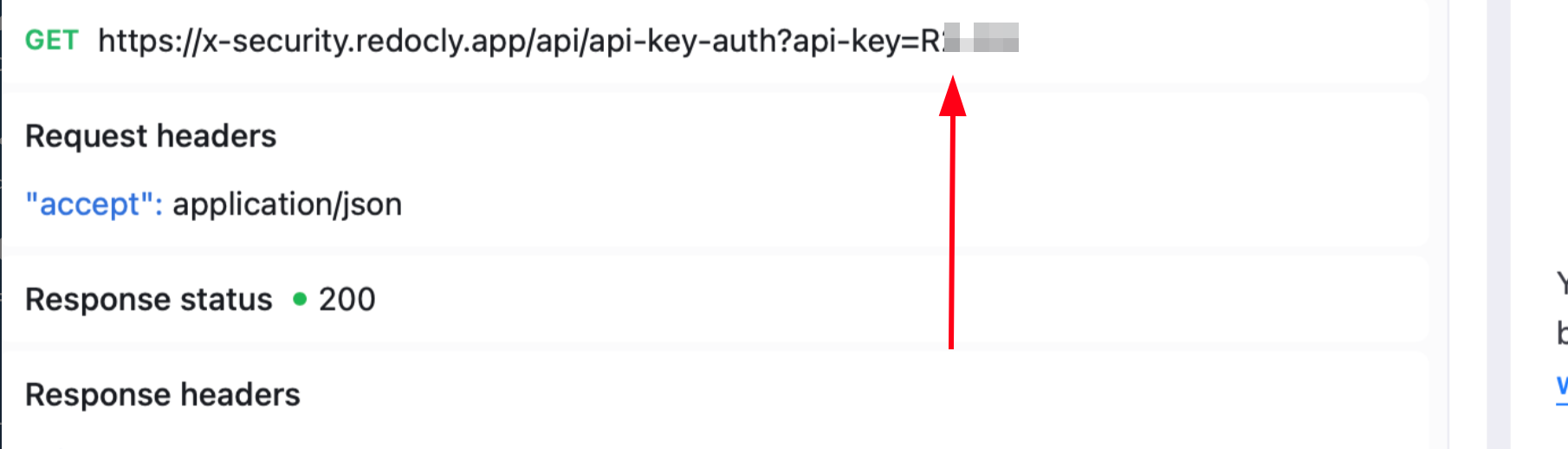
If a security value is marked as Secret, it should also be masked in the execution logs/steps:
What was confusing?
- Calls run by AI is not present in History
- When we asked AI to interact with the app it sometimes continued to swith tabs on AI despite the fact we were interacting with it also. What made you smile?
- It was fun, fast and efficient.